

Web Booking API flow
Overview
This page lists the usual API calls behind a web booking flow.
Follow the steps in order.
Never expose your API client secret in a browser or mobile app.
Keep it on your server.
Flow in short
Request a token (log in).
Request an offer (price and availability).
Get the passenger list (and set names).
Load postal codes (required to save).
Load products and supplements.
Save the booking.
Request token
Request a token by calling /api/token with POST.
You will use the returned access_token in later calls.
For more details about authentication, see Restful API authentication.
Example request (placeholders):
Example response:
Request parameters:
grant_type - Authentication type.
passwordrequires username and password.scope - Not currently enforced. Use
read.username - The user name.
password - The password.
The Authorization header uses Basic authentication.
It is a Base64-encoded value built from client_id:secret.
Do not store the client secret on the client side.
Example format:
client_id:secret
Response fields:
access_token - Token used to authorize other API calls.
token_type - Authorization scheme (usually
bearer).expires_in - Token lifetime in seconds.
refresh_token - Used to request a new access token. Store it securely.
Refresh token
The access token expires after a short time.
When it expires, the API returns 401 Unauthorized.
Use the refresh_token to request a new access token.
Store refresh tokens securely.
This is the 401 Unauthorized response:
HTTP/1.1 401 Unauthorized Content-Type: application/json; charset=utf-8 Server: Microsoft-IIS/7.5 WWW-Authenticate: Bearer X-Powered-By: ASP.NET Date: Wed, 01 Apr 2015 07:54:55 GMT Content-Length: 163
In order to get a new access token:
Request offer
The offer call returns general information about the trip package.
Example offer request:
GET https://api.tourpaq.com/api/offers?pltaIDs=1241703&roomNo=1&priceType=1&periodID=1&adultNo=1&childNo=2&infantNo=1&childrenAges=9 HTTP/1.1 User-Agent: Fiddler AbsoluteLinks: true Accept: application/hal+json Authorization: Bearer mWHMYrMnLW ... U-GUVneEDsxYLUgWCYdcw Host: api.tourpaq.com
You can find more information about this call here:
https://api.tourpaq.com/help/api/offers
pltaIDs is the offer identifier.
It can be one value or a list of values separated by commas.
If pltaIDs is a list (for example 23,26), these parameters must also be lists with the same number of values:
roomNopriceTypeadultNochildNoinfantNo
Examples:
Example A (two offers, one child in room 2):
Example B (children split by room using
|):
In example (a), there are two room types.
Each room has two adults.
Only the second room has a child.
Only the first room has an infant.
In example (b), childrenAges uses | to separate children by room.
The response includes a notificationStatus field that can be success, warning, or error.
Passenger distribution in rooms
This call returns a list of passengers distributed into rooms.
You can call it at the same time as the offer call.
You can then:
replace placeholder passenger names with real names
add or remove products and supplements per passenger
save the booking
GET https://api.tourpaq.com/api/passengers?pltaIDs=1241703&roomNo=1&priceType=1&periodID=1&adultNo=1&childNo=2&infantNo=1&childrenAges=9,1&distribute=Manual HTTP/1.1 User-Agent: Fiddler Host: api.tourpaq.com AbsoluteLinks: true Accept: application/hal+json Authorization: Bearer CS0V03QVH8 ... yNCFCUcZEbG8DL4U9qFXS
More information:
https://api.tourpaq.com/help/api/wb-passengers
Postal codes
Postal code is required to save a booking.
This call provides a list of postal codes.
You can usually cache this response.
GET https://api.tourpaq.com/api/postcode/countries HTTP/1.1 User-Agent: Fiddler AbsoluteLinks: true Accept: application/hal+json Authorization: Bearer CS0V03QVH8HBeECL ... CUcZEbG8DL4U9qFXS Host: api.tourpaq.com
More information:
https://api.tourpaq.com/help/api/postalcode-countries
Products
Available products for the current booking configuration.
GET https://api.tourpaq.com/api/relevantProduct?pltaIDs=1241703&roomNo=1&priceType=1&periodID=1&adultNo=1&childNo=2&infantNo=1&childrenAges=9,1 HTTP/1.1 User-Agent: Fiddler AbsoluteLinks: true Accept: application/hal+json Authorization: Bearer 4L6-8EyfvS ... ZNOW4-L4 Host: api.tourpaq.com
More information:
https://api.tourpaq.com/help/api/wbrelevantproduct
Supplements
Available supplements for the current booking configuration.
GET https://api.tourpaq.com/api/relevantSupplement?pltaIDs=1241703&roomNo=1&priceType=1&periodID=1&adultNo=1&childNo=2&infantNo=1&childrenAges=9,1 HTTP/1.1 User-Agent: Fiddler AbsoluteLinks: true Accept: application/hal+json Authorization: Bearer 4L6-8EyfvSkhsF9M ... OW4-L4 Host: api.tourpaq.com
More information:
https://api.tourpaq.com/help/api/svrelevantsupplement
Save booking with no payment
Use this call to save the booking right away when no payment is needed.
More information:
https://api.tourpaq.com/help/api/attemptToSaveBooking
https://api.tourpaq.com/Help/ResourceModel?modelName=BookingInformationRequestBody
The passenger data can be filled from the /api/passengers response.
Example request (headers only):
This call includes personal data (names, contact details, etc.).
Avoid logging request bodies in plain text.
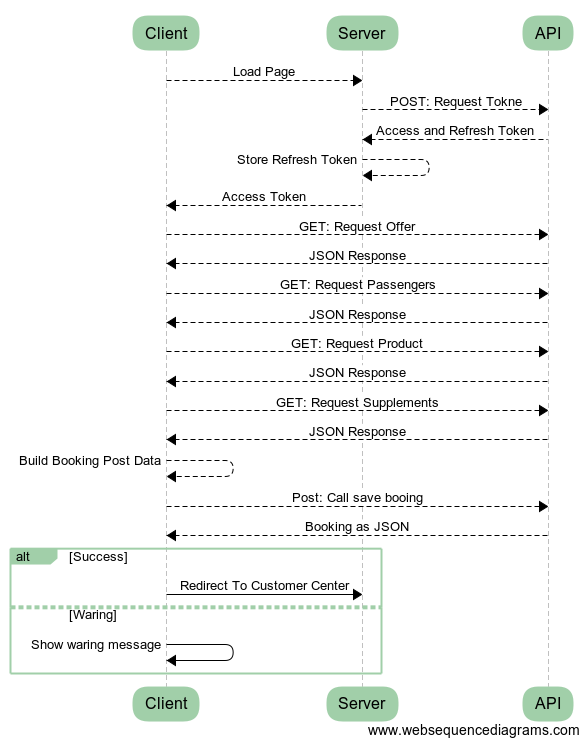
Flow on a single page Application
Related pages
FAQ
Why do I get 401 Unauthorized?
Most often, the access token expired.
Refresh the token, then retry the call.
Why do I need postal codes?
Postal code is required when you save a booking.
Load postal codes before saving.
Last updated
Was this helpful?